Showing posts with label Silent Movie. Show all posts
Showing posts with label Silent Movie. Show all posts
Monday, 6 February 2012

Sketchbook 2
This sketchbook contains most of my storyboarding and scene drawings as well as idea's.
Monday, 9 January 2012
Drop 3
This was the last animation i made and i wanted to make it a bit more playful and just really experiment with individual movement of the letters trying to make the movements as lifelike as possible. This turned out to be much harder then i thought but it did teach me a lot about pace and timeline. Getting movements spot on with realistic pace was a bit of a challenge.

An idea of my layering and keyframes throughout the animation. I would key frame the beginning of each layer with everything i "might" use by doing this it allows me to edit something down the line without ruining the entire animation. It also stops a problem i find in AE which is that it just makes some of my keyframes disappear half way through my animation this might be due to my inexperience on the software but just keyframing everything at the start seems to of stopped this happening.


The D had to drop down on the axis of the ruler line i put down but for me to do this i had to keyframe the Ancorpoint at the bottom of the letter, this would give it a realistic pivot across the bottom of the letter.

Problem was then after i had moved the centre point of the letter i had to put it back in the middle to make the falling and rotation of the letter around the middle point this was crudely done but just moving the D back in position after moving the ancor point. When u move the ancor point it automatically moves the rest of the letter in relationship to that so it causes a bit of problem when trying to line up the animation properly.

Z axis is sexy, probably my favourite tool in AE. Creating the idea of depth makes animations far more interesting.

End result. its off centre but i like it, the depth makes the animation more interesting aswell.
Time Workshop


These time scale workshops were incredibly helpful, maybe not necessarily on the scale of 5 seconds but i can see the value on something like 60 seconds. I didn't realise pace and speed would have such a big impact on time, it made me rethink a lot of my animations mainly because the actual pace of them were way faster then originally expected.
Friday, 6 January 2012
Drop 2
This was my first attempt at using a camera. I wanted to use one im my main sequence so i figured i should test it out first and see if its simple to use or not. This was a very simple experiment i just keyframed the camera through the letters and rotated the letters as i went along giving it the feeling that they were falling past me.


Thursday, 5 January 2012
Disperse


This is my first animation so i kept it simple by keeping everything within the composition box, just exprimenting around with simple rotations to see if i can get a realistic 'explotion' with the pace of each individual letter. This was relatively easy to do and simple.
Wednesday, 4 January 2012
Disperse


Instead of trying an effect i wanted to achieve the feeling of an explosion dispersing by animation it myself, I had to take the word into photoshop and actually cut it up into about 40 layers which time consuming but i learned a lot when it came to importing compositions into after effects. Individually animating the pieces was yet again time consuming but i managed to get exactly the effect i wanted. Playing around with X, Y and Z helped me to get a realistic feeling of 3D space as well.
Tuesday, 3 January 2012
Drop 1


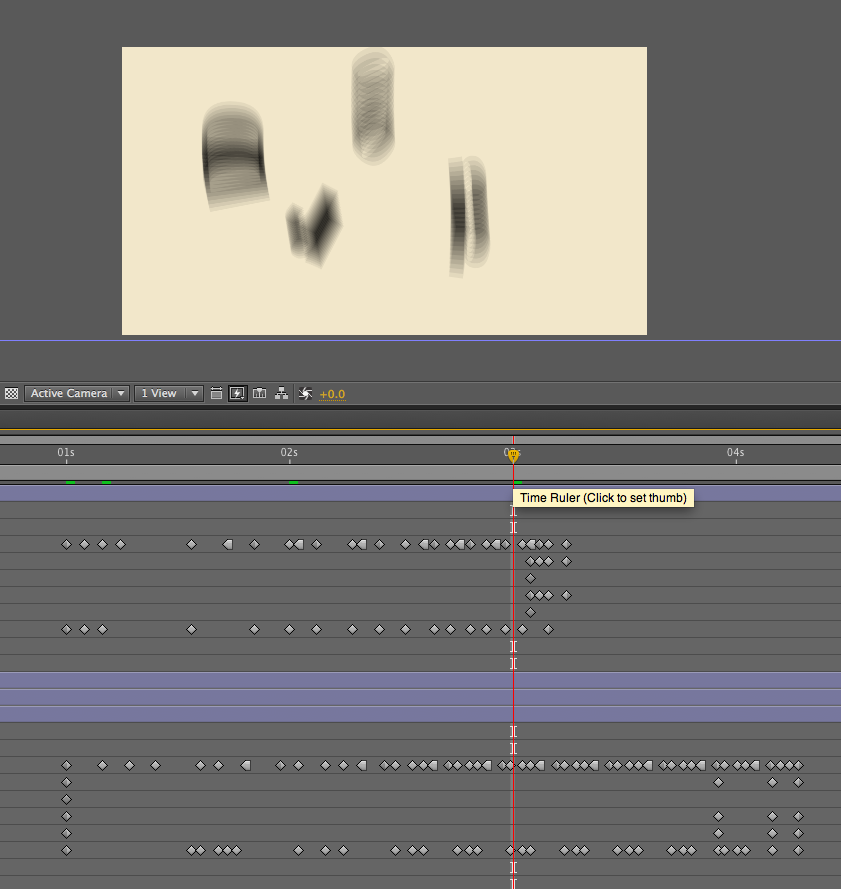


This is my favourite animation by far, by making an imaginary line i got an idea of a floor the word could drop on. i started using hold key frames and the blur effect to give it the fast falling effect then just placing the letters properly in the end position using the X, Y and Z tools made it look like dropped flat on the floor.
Monday, 12 December 2011
Work Shop Q&A
What Problems have I encountered?
One of the problems i found was placing your specific time of your animation across a measured area, I found this fairly easy when applying a simple number like 60 seconds or 30 seconds across a timeline, this breaks up the values equally. It was a bit harder applying a number like 56 seconds across it as the numbers didn't break equally.
WhatI have learned?
Laying out a sequence is easy but then applying it to a timeline is not so straight forward, I found that when applying my sequence across a timeline i had to take into account the pace of the animation in real time and this often resulted in the scenes being much shorter.
A timeline helps to show pace in a sequence speeding up or slowing down instead of just showing the key frames you can work out how your frames will sit across your timeline.
The simple maths to working out a timeline:
One of the problems i found was placing your specific time of your animation across a measured area, I found this fairly easy when applying a simple number like 60 seconds or 30 seconds across a timeline, this breaks up the values equally. It was a bit harder applying a number like 56 seconds across it as the numbers didn't break equally.
WhatI have learned?
Laying out a sequence is easy but then applying it to a timeline is not so straight forward, I found that when applying my sequence across a timeline i had to take into account the pace of the animation in real time and this often resulted in the scenes being much shorter.
A timeline helps to show pace in a sequence speeding up or slowing down instead of just showing the key frames you can work out how your frames will sit across your timeline.
The simple maths to working out a timeline:
(Time of animation in seconds) / (Length of timeline in centimeters)
=This will give you your equal distances to break up your timeline.
Friday, 9 December 2011
Crit


Criticism on my sequences were that the 3D elements weren't very clear with the shading, but this was just my badly executed hand drawn skills. All my Sequences were relatively clear and could be made out to be what it looked like it was going to be except the bottom sequence on the Top Sheet, I instantly knew this sequence would have some trouble being translated into only 10 frames so i even attempted to draw a diagram on the side of it to make it more clear. But after talking about it and how it would work on screen it was given the all clear.
Advice from Lorraine:
With Regard to 3D, The 3D button will pretty much produce something as 3D as a board board cut out, which made a lot of sense, as i played around with this option and pivoting type it wasn't as 3D as it started out to be.
A quick way to model text in illustrator: Create outlines for type then copy and paste straight into after effects, then change the text in illustrator to what you want to be and then copy and paste into after effects you should then be able to animate the middle bit in AE easily.
First After Effects Test
I decided to have a quick go on after effects while waiting for my crit and i was rather surprised at how easy a simple animation was. This animation did teach me that the frame sequences we were drawing were good but at the end of the day it was very hard to predict the temporal properties of the animation. I ended up animating this sequence then changing it as i had 2 seconds left with my animation finished, so i just changed a few of my idea's aspects and managed to easily fill the 5 seconds. Also realised half way through that using the "Safe Zone's" were all good in practice but this brief is aimed for view on screen not a tv and i forgot about that while producing this and ended up going back to my frames and moving everything around to fit around the 1050 x 576 pixel box.
This quick test made me appreciate setting frames on timelines although going onto screen and playing in after effects seemed to be a quick easy solution instead.
At the end of the scene u will see the D is suppose to sit against the wall but i missed out arranging it when going back to it.
Work Shop Task for Lorraine

This is my first initial sheet with 2 sequences on but after rethinking i changed both of them to something with works a bit better and would look better on screen, pretty much combine these two with 2 other sequences to fill up the 5 seconds.


My only worry is taking the 3D elements into after effects, after animating a simple 2D one i realised its very easy but i could get stuck with the more technical side of animating when getting to my harder sequences.
Subscribe to:
Posts (Atom)